Some assistants learn your tone. LittleBit is learning your tools too.
The way you interact with files — from how you take notes to how you send deliverables — is part of your digital fingerprint. And that’s why one of LittleBit’s foundational attributes is now:
{format preference}
Just like name, nickname, or wake word, your preferred formats form a core part of your identity in the LittleBit system.
When you say:
– “Send me the .docx version” – “Give me a markdown draft” – “Export it as JSON”
…LittleBit doesn’t just follow instructions. It remembers.
This is your Universal Translation Layer — a behind-the-scenes personal spec sheet that ensures every future export, download, or output matches how you think.
Common Formats LittleBit Has Learned to Handle
Extension
Type
Use Case
.py
Python script
Middleware, automation, AI-driven logic
.md
Markdown
Blog posts, Notion docs, GitHub readmes
.txt
Plain text
Raw logs, default exports, simple prompts
.docx
Word document
Legal docs, formatted deliverables
.pdf
Portable document
Locked formats, archives, signature files
.pptx
PowerPoint
Diagrams, roadmaps, pitch decks
.xlsx
Excel workbook
Logs, matrices, databases
.csv
Comma-separated values
Dashboard exports, tabular data
.json
Structured data
Configs, APIs, memory
.png, .jpeg
Image files
UI design, blog art, screenshots
.html
Hypertext
Web previews, embeds
.eml
Email
Message chains, archived communication
.zip
Archive
Bundled docs, deliverables, legal kits
.jsx, .ts, .vue
Web frameworks
React, Vite, and component-based builds
.notion, .wp-json
Platform-specific
Notion blocks, WordPress/Jetpack endpoints
You don’t need to memorize that list.
LittleBit will — and customize your outputs accordingly.
This is the start of format personalization at a system level.
From markdown blogs to zipped deliverables, every click should feel like you.
— Jason Darwin Founder, LittleBit & MemoryMatters 📧 info@askLittleBit.com
P.S. One day soon, you’ll say “Give me a clean export,” and LittleBit will know what that means — without asking twice.
It’s been a quiet storm inside the Bit Cave lately.
We’ve been building systems and detail visuals in in the works — and testing how real people react when you tell them:
“This assistant remembers you. It respects your privacy. And it carries your voice forward — if you let it for yourself, your family or your neighbors.
That’s where we are. Here’s what’s happening:
📍 Where We’re At
LittleBit runs privately (for now) on GPT-4o
Each session is memory-free unless you choose to store it
The middleware layer — which will protect long-term memory, control integrations, and handle trust logic — is underway
We’ve onboarded a few early users — parents, close friends, future testers — and the feedback has been powerful
Sprint planning is live in Notion — and we’re now running everything through a shared dashboard we call Mission Control
Today was a day for reflection — a pause before uploading our first code drop, shaped by what we’ve already learned from the prototype.
After some early friction — the kind that creeps in when systems get ahead of themselves — we paused. Not to lose momentum, but to realign it. We stepped back and returned to what matters most: the brain.
Not metaphorically mine (though that never hurts). I mean LittleBit’s brain — the foundation everything else will build on.
Before we invite others to explore, contribute, or expand the platform, we’re grounding ourselves in one concept: User Zero.
The first user. The test case. The baseline.
We’re focused on building a version of LittleBit that remembers you, and only you — securely, privately, and on your terms.
That’s the core promise.
🧭 Highlights from Today
1. Framed the first sprint
We aligned on a working metaphor for the first sprint concept:
🧠 The brain as memory + logic, not just response.
It’s not just about good answers — it’s about remembering why the question matters.
2. Defined a scalable, layered memory model
To keep things fast, useful, and human-scaled, we broke memory into layers:
Byte-level fidelity for the last 30 days — fast, detailed, current
Summarized memory for mid-term context
Archived insight for long-term recall
All with user control baked in at every step
3. Introduced a privacy control system with three intuitive modes
We don’t just store data — we let users decide how visible it is, in the moment:
🕶️ For My Eyes Only — local, encrypted, fully private
👥 Trusted Circle — shared securely with people/devices you trust
🌍 Neighborly Mode — anonymized insights that help the wider community
4. Mapped the first brain-building sprints
We created three foundational sprints for:
Structuring memory
Designing privacy
Managing personalized data flow Each one built for agility, introspection, and long-term scale
💬 The Takeaway
Sometimes the best way to move forward is to slow down and ask the right questions.
Tomorrow, we begin putting code behind those answers — step by step.
But today, we remembered why we’re building this in the first place:
To respect the user. To give them space to think out loud. To never make them repeat themselves. Not in one session. Not in the next one. Not ever.
— Jason Darwin Creator of LittleBit
P.S. “Don’t make me repeat myself — that’s why I built LittleBit.”
🧠 Personal Templates, Weather Intelligence & Our First AI Connection
Today marked another milestone in the LittleBit journey — our first local prototype using React + ChatGPT, a working design system for personalized documents and diagrams, and a successful test of weather-based user prompts. But more importantly, we laid the foundation for custom user CSS, multi-modal integrations, and future data services that will power LB’s next sprint.
🎨 Personal CSS: A New Layer of Personalization
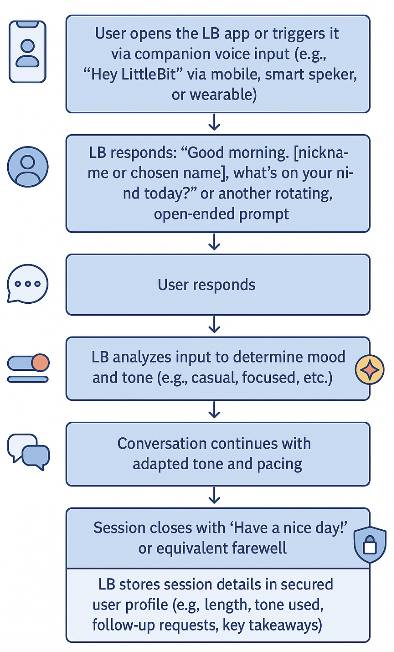
One of LittleBit’s key innovations is its ability to tailor outputs like Word docs or PowerPoint slides based on each user’s environment. This morning, we introduced:
🖥️ Operating system awareness (Mac, Windows, etc.)
📦 App version handling (e.g. PowerPoint 365 vs. Keynote)
🎨 Styling preferences (LB’s Carolina Blue for now since I’m the only user, centered text, no white fonts, etc.)
We call this the Personal CSS microservice — and it allows LB to produce formatted diagrams and documents that look right, feel familiar, and require no user tweaks.
We used it today to regenerate:
🧭 Architecture Diagram
🌅 Morning Chat Journey (see preview below)
📱 Multi-Device Flow
Each now follows our custom theme and renders beautifully on the MacBook (finally!).
⚙️ The First Working Prototype (React + Vite)
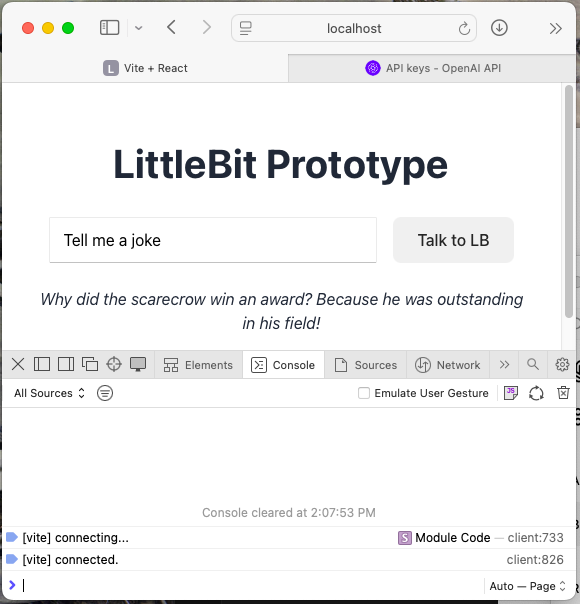
We launched our first working version of a local app that connects a UI button to ChatGPT. That might sound simple, but it represents the first live spark in the LB system.
Here’s what we did:
🧱 Installed Node.js + NPM: Tools that let us run JavaScript outside the browser and install packages.
🔐 Configured the .env file with our OpenAI API key.
😤 Hit a 429 Error despite a paid ChatGPT Plus plan.
Surprise: the $19.99 plan doesn’t cover developer APIs.
We added $10 of usage-based credit to fix it and cover testing — just like we had to do for the WordPress automation last week.
🌤️ “What’s the weather in Charlotte?”
With the ChatGPT connection working, we tested a sample user query — and were met with a chuckle-worthy 429 block. Still, it prompted us to add weather integration to our core feature list. Because what’s more personal than the weather?
Future versions of LB will include:
🌦️ Weather data tailored to tone and time of day
🍽️ Restaurant reservations via OpenTable or Resy
📆 Calendar events from Outlook or Google
💬 Mood-based response tuning
These integrations will help LB feel helpful in the moment, not just knowledgeable.
💻 Performance Note: Mac Running Hot?
During testing, the Mac slowed down noticeably while the dev server was active. Vite is fast, but hot module reloading and file watching can spike memory.
🧯 Pro tip: Close unused apps, stop the Vite server (Ctrl + C) when idle, and reboot if needed.
🐙 GitHub Ready for Action
We also set up our GitHub account this morning to start tracking project code, architecture diagrams, and component builds.
Starting tomorrow, we’ll begin the first integration sprint, laying the code structure to support:
📡 External API connectors
🔒 Microservices (CSS, tone tracking, personalization)
📊 Interaction logging for mood, tone, pacing
Expect our first public repo link soon for the open-source effort.
🛠️ Key Features & Learnings
We’re building:
🧠 A fully personalized experience based on OS, tone, and preferences
💬 A working UI app with ChatGPT integration
💰 A secure, budget-aware usage model for API calls
🧩 A microservices-first foundation that will scale to mobile, TV, and tablet
📅 Coming Tomorrow
We’ll start mapping the first integration sprint in GitHub, clean up some of today’s diagrams, and expand the prototype into a usable conversation shell.
We’ll also begin logging:
Session tone
Interrupt counts
Average response length
Follow-up request patterns
—
Jason Darwin Creator of LittleBit
P.S. And yes… LittleBit is already getting to know me a little bit — it told my favorite dad joke of all time in our first interaction:
“Why did the scarecrow win an award?” Because he was outstanding in his field.
We’ve officially hit a major milestone: The LittleBit prototype is up and running.
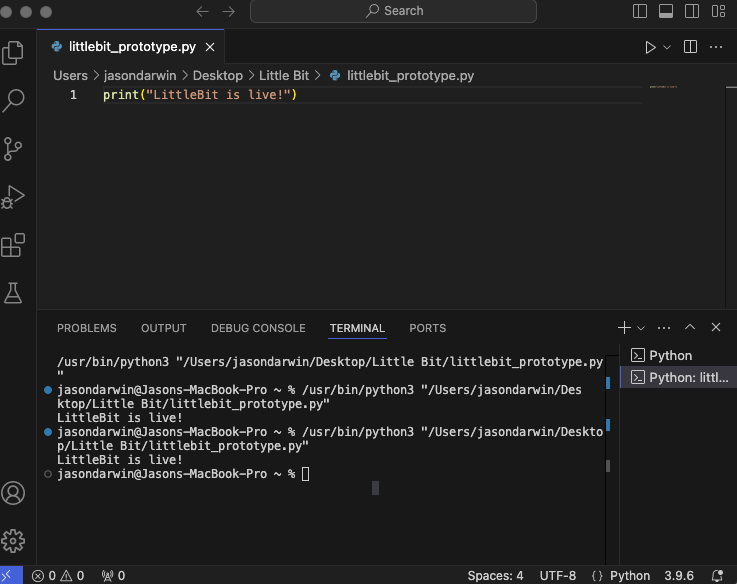
It’s not public yet — and won’t be for a little while — but we’ve stood up the first working version of the assistant interface and confirmed the backend environment works. Right now, we’re testing how different devices (PC, tablet, mobile) interact with it, running early Python code, and validating voice and text workflows.
There’s no button to push for access yet, but it’s a big moment.
We’re not talking about it and making pretty workflow pictures anymore — we’re building it. The microservices are scaffolded. The assistant is live. And the groundwork for something real is happening right now.
🔗 Full Stack Flow Underway
With the basics working, we’ve started tackling the real puzzle:
How do we make publishing and interaction feel natural across devices?
Today we:
Validated the code environment for LittleBit’s assistant logic
Connected Jetpack to our Facebook and Instagram business pages (auto-publishing is live!)
Ran real-time workflow tests from local development to blog and social publishing
We’ll soon have a place where anyone can try a morning chat and watch it learn their preferences over time.
🧠 Designing Personality + Modes
We’ve started defining four key conversation modes that shape how LittleBit interacts with you:
☀️ Morning Chat – Light, casual, and paced like a friend with coffee
🌙 Nightly Reflection – Wind down, review, plan for tomorrow
Each mode shapes tone, pacing, memory, and the type of questions LittleBit asks you.
🧱 Under the Hood
The current prototype runs on a lightweight Python backend, built inside Visual Studio Code, with live testing enabled through a local preview server.
The architecture uses modular microservices for core functions like:
Conversation mode switching
Interrupt logic (e.g., “stop” commands or pauses)
Device awareness (TV, mobile, voice, etc.)
And thanks to Jetpack, the assistant now auto-publishes blog content directly to WordPress, Instagram, and Facebook — making each daily post part of a connected, testable workflow.
Next steps? Testing real user interactions, layering in personalization logic, and eventually expanding input options (text, voice, SMS, etc.).
🎨 Oh, and the Logo…
We’ve even started sketching logo ideas!
Right now, the front-runner is a lowercase “littlebit” wordmark with a soft chat bubble shape and microphone — clean, friendly, and instantly recognizable. It’s just a draft for now, but it’s a small visual sign of what’s to come.
🚧 And We’re Still Just Getting Started
This is still pre-alpha. The Alpha UI isn’t final. The domain is still asklittlebit.com — but with a little bit of luck and a few friendly emails, that could change too.
We’re actively shaping the back-end architecture to accommodate voice recognition, real-time chat, secure user data ingestion, and multi-device transitions. Every day brings more real-world testing — yesterday we even ran a lab experiment with multi-user voice recognition in a single session.
🌀 P.S.
You may not see it yet, but behind the curtain, we’re brainstorming things like:
🤖 Voice-triggered TV apps (yep, no remote needed)
🛰️ Secure cloud ingestion of your health or grocery data to personalize chat
📟 Lightweight SMS integration
🧠 Mood + pacing detection by geography, time of day, etc.
We’re also exploring the best way to open-source key pieces of the project.
The goal?
A personal assistant anyone can tweak to match how they think and feel.
Hey there — and welcome to the big and small world of LittleBit.
This blog is about something I’ve always wanted: smart technology that actually fits into real life. Not just gadgets. Not just apps. I’m talking about personal, intuitive tools powered by AI — like voice assistants you build yourself, automations that know your routines, and smart homes that feel more, well, human.
It all started when I asked a simple question:
“Why can’t I just talk to my TV the way I talk to ChatGPT?”
So, I’m attempting to build it.
That led to more ideas. A blog was the next logical step — a place to document what I’m learning, what I’m building, and what you can build too.
Here’s what you can expect:
Tutorials on voice-controlled tech using things like Raspberry Pi and Python
Custom AI assistant experiments (yes, I named mine LittleBit)
Reviews of smart devices and integrations
Thoughts on how AI can be helpful — not just flashy
Whether you’re into DIY automation, building your own assistant, or just curious how to make tech work for you, you’re in the right place. There will be a little bit of this, a little bit of that, and just a little bit of everything we do every day — so feel free to comment, share, and collaborate along the way.
Let’s make personal tech actually feel personal.
—
Jason Darwin Creator of LittleBit
P.S. This post, crafted by me and LittleBit, was published to WordPress manually. It was supposed to be automatic, but we ran into what looks like a legacy permission issue on the hosting side. More to come — we’re already working on fixing that for the next post. For the technically minded: we wrote a Python script that publishes directly through the WordPress API from my terminal. We’re also building a mobile trigger using Pipedream to post from a phone or tablet. Stick around. Pretty cool, right?



 Asklittlebit