There’s a point in every project where things stop feeling like ideas… and start becoming infrastructure.
For LittleBit, that moment is now.
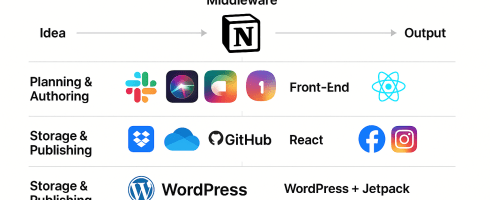
What started as voice prompts and memory logic is now a fully interconnected system — across devices, platforms, and use cases. Today, we’re sharing the first look at the LittleBit Lumascape.
🧭 What You’re Looking At
The diagram starts to show the systems we’ve established and refining.
- Every system currently being tested (planning, authoring, middleware, front-end)
- How they’re grouped by function
- How they work together to power the LittleBit experience
From idea to prompt, from blog post to real-time voice interaction — this is what we’re using to build the personal AI ecosystem of the future.
🧩 Why It Matters
We don’t use tools just to check boxes.
We use them because each one fills a role:
- Notion for thinking and tagging
- Trello for sprint planning and testing
- React for building the front-end experience
- Dropbox for version-controlled memory storage
- WordPress + Jetpack to publish what we learn in real time
Each piece is there because it solves a problem — and together, they give LittleBit structure, memory, and flexibility.
🔁 What Comes Next
This lumascape is just the top layer.
Next we’ll break it down:
- System by system
- Workflow by workflow
- And eventually, turn this entire process into something you can reuse, remix, and make your own
Because LittleBit isn’t just for me.
It’s for anyone who wants to remember better, respond better, and connect more personally — across any interface, on their terms.
Thanks for being here. Even if you’re just watching the system form in the shadows, you’re already part of it.
— Jason Darwin
Creator of LittleBit

 Asklittlebit