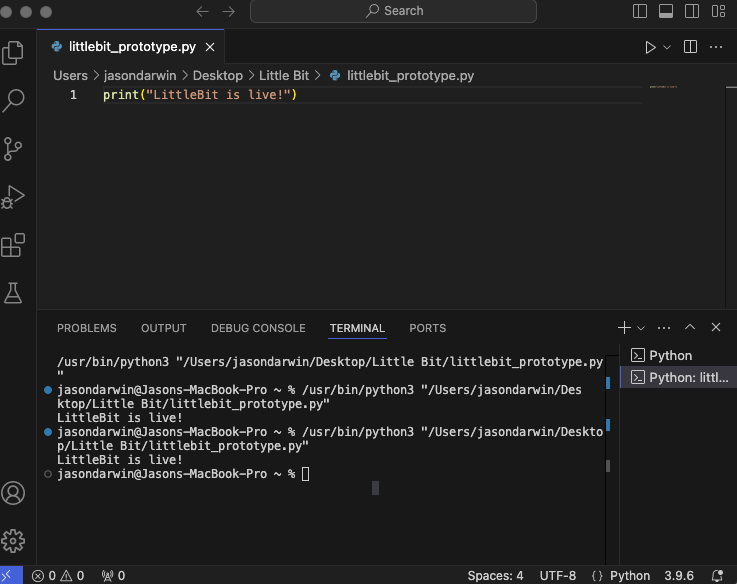
We’ve officially hit a major milestone: The LittleBit prototype is up and running.
It’s not public yet — and won’t be for a little while — but we’ve stood up the first working version of the assistant interface and confirmed the backend environment works. Right now, we’re testing how different devices (PC, tablet, mobile) interact with it, running early Python code, and validating voice and text workflows.
There’s no button to push for access yet, but it’s a big moment.
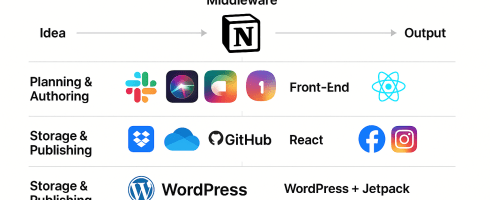
We’re not talking about it and making pretty workflow pictures anymore — we’re building it. The microservices are scaffolded. The assistant is live. And the groundwork for something real is happening right now.
🔗 Full Stack Flow Underway
With the basics working, we’ve started tackling the real puzzle:
How do we make publishing and interaction feel natural across devices?
Today we:
- Validated the code environment for LittleBit’s assistant logic
- Connected Jetpack to our Facebook and Instagram business pages (auto-publishing is live!)
- Ran real-time workflow tests from local development to blog and social publishing
We’ll soon have a place where anyone can try a morning chat and watch it learn their preferences over time.
🧠 Designing Personality + Modes
We’ve started defining four key conversation modes that shape how LittleBit interacts with you:
- ☀️ Morning Chat – Light, casual, and paced like a friend with coffee
- 💡 Brainstorming – Fast, creative, idea-first back-and-forth
- 🛠️ Work Mode – Focused, minimal distractions
- 🌙 Nightly Reflection – Wind down, review, plan for tomorrow
Each mode shapes tone, pacing, memory, and the type of questions LittleBit asks you.
🧱 Under the Hood
The current prototype runs on a lightweight Python backend, built inside Visual Studio Code, with live testing enabled through a local preview server.
The architecture uses modular microservices for core functions like:
- Conversation mode switching
- Interrupt logic (e.g., “stop” commands or pauses)
- Device awareness (TV, mobile, voice, etc.)
And thanks to Jetpack, the assistant now auto-publishes blog content directly to WordPress, Instagram, and Facebook — making each daily post part of a connected, testable workflow.
Next steps? Testing real user interactions, layering in personalization logic, and eventually expanding input options (text, voice, SMS, etc.).
🎨 Oh, and the Logo…
We’ve even started sketching logo ideas!
Right now, the front-runner is a lowercase “littlebit” wordmark with a soft chat bubble shape and microphone — clean, friendly, and instantly recognizable. It’s just a draft for now, but it’s a small visual sign of what’s to come.
🚧 And We’re Still Just Getting Started
This is still pre-alpha. The Alpha UI isn’t final. The domain is still asklittlebit.com — but with a little bit of luck and a few friendly emails, that could change too.
We’re actively shaping the back-end architecture to accommodate voice recognition, real-time chat, secure user data ingestion, and multi-device transitions. Every day brings more real-world testing — yesterday we even ran a lab experiment with multi-user voice recognition in a single session.
🌀 P.S.
You may not see it yet, but behind the curtain, we’re brainstorming things like:
- 🤖 Voice-triggered TV apps (yep, no remote needed)
- 🛰️ Secure cloud ingestion of your health or grocery data to personalize chat
- 📟 Lightweight SMS integration
- 🧠 Mood + pacing detection by geography, time of day, etc.
We’re also exploring the best way to open-source key pieces of the project.
The goal?
A personal assistant anyone can tweak to match how they think and feel.
Stay tuned.
We’re building a little bit more every day.
Tags: Accessible technology, ai, AI assistant, artificial-intelligence, chatgpt, Conversation design, Digital assistant, Human-centered AI, Jetpack, littlebit, microservices, Open source, Personal assistant, Pre-alpha, Prototype, Python development, Smart TV, Social publishing, technology, UX design, Voice assistant

 Asklittlebit