There’s a point in every project where things stop feeling like ideas… and start becoming infrastructure.
For LittleBit, that moment is now.
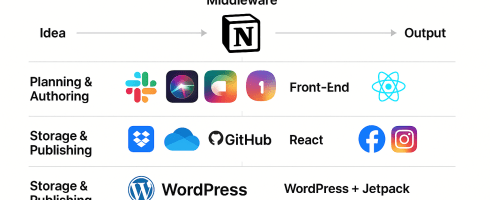
What started as voice prompts and memory logic is now a fully interconnected system — across devices, platforms, and use cases. Today, we’re sharing the first look at the LittleBit Lumascape.
🧭 What You’re Looking At
The diagram starts to show the systems we’ve established and refining.
Every system currently being tested (planning, authoring, middleware, front-end)
How they’re grouped by function
How they work together to power the LittleBit experience
From idea to prompt, from blog post to real-time voice interaction — this is what we’re using to build the personal AI ecosystem of the future.
🧩 Why It Matters
We don’t use tools just to check boxes.
We use them because each one fills a role:
Notion for thinking and tagging
Trello for sprint planning and testing
React for building the front-end experience
Dropbox for version-controlled memory storage
WordPress + Jetpack to publish what we learn in real time
Each piece is there because it solves a problem — and together, they give LittleBit structure, memory, and flexibility.
🔁 What Comes Next
This lumascape is just the top layer.
Next we’ll break it down:
System by system
Workflow by workflow
And eventually, turn this entire process into something you can reuse, remix, and make your own
Because LittleBit isn’t just for me.
It’s for anyone who wants to remember better, respond better, and connect more personally — across any interface, on their terms.
Thanks for being here. Even if you’re just watching the system form in the shadows, you’re already part of it.
🧠 Personal Templates, Weather Intelligence & Our First AI Connection
Today marked another milestone in the LittleBit journey — our first local prototype using React + ChatGPT, a working design system for personalized documents and diagrams, and a successful test of weather-based user prompts. But more importantly, we laid the foundation for custom user CSS, multi-modal integrations, and future data services that will power LB’s next sprint.
🎨 Personal CSS: A New Layer of Personalization
One of LittleBit’s key innovations is its ability to tailor outputs like Word docs or PowerPoint slides based on each user’s environment. This morning, we introduced:
🖥️ Operating system awareness (Mac, Windows, etc.)
📦 App version handling (e.g. PowerPoint 365 vs. Keynote)
🎨 Styling preferences (LB’s Carolina Blue for now since I’m the only user, centered text, no white fonts, etc.)
We call this the Personal CSS microservice — and it allows LB to produce formatted diagrams and documents that look right, feel familiar, and require no user tweaks.
We used it today to regenerate:
🧭 Architecture Diagram
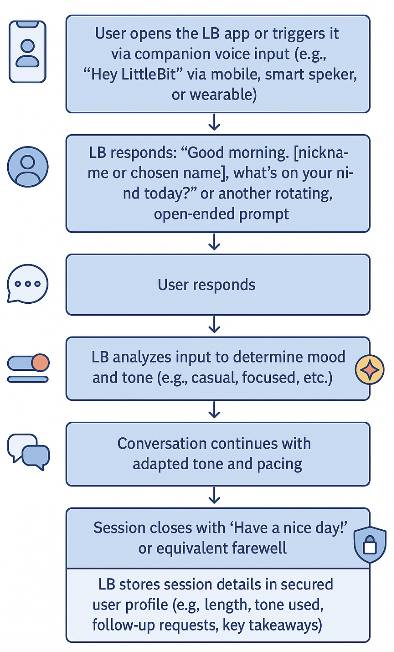
🌅 Morning Chat Journey (see preview below)
📱 Multi-Device Flow
Each now follows our custom theme and renders beautifully on the MacBook (finally!).
⚙️ The First Working Prototype (React + Vite)
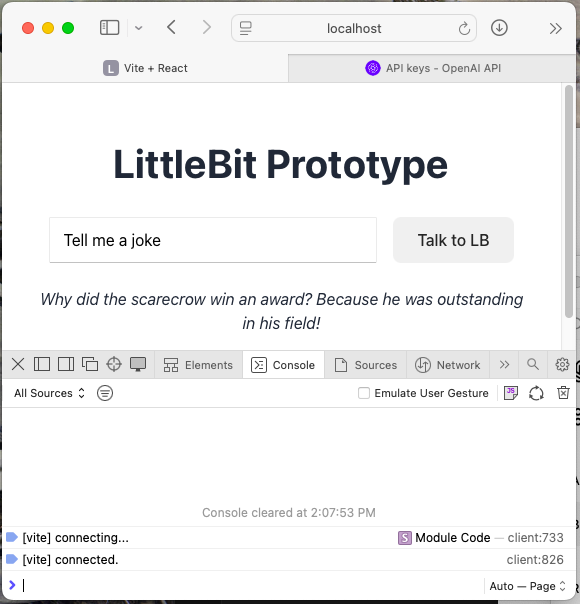
We launched our first working version of a local app that connects a UI button to ChatGPT. That might sound simple, but it represents the first live spark in the LB system.
Here’s what we did:
🧱 Installed Node.js + NPM: Tools that let us run JavaScript outside the browser and install packages.
🔐 Configured the .env file with our OpenAI API key.
😤 Hit a 429 Error despite a paid ChatGPT Plus plan.
Surprise: the $19.99 plan doesn’t cover developer APIs.
We added $10 of usage-based credit to fix it and cover testing — just like we had to do for the WordPress automation last week.
🌤️ “What’s the weather in Charlotte?”
With the ChatGPT connection working, we tested a sample user query — and were met with a chuckle-worthy 429 block. Still, it prompted us to add weather integration to our core feature list. Because what’s more personal than the weather?
Future versions of LB will include:
🌦️ Weather data tailored to tone and time of day
🍽️ Restaurant reservations via OpenTable or Resy
📆 Calendar events from Outlook or Google
💬 Mood-based response tuning
These integrations will help LB feel helpful in the moment, not just knowledgeable.
💻 Performance Note: Mac Running Hot?
During testing, the Mac slowed down noticeably while the dev server was active. Vite is fast, but hot module reloading and file watching can spike memory.
🧯 Pro tip: Close unused apps, stop the Vite server (Ctrl + C) when idle, and reboot if needed.
🐙 GitHub Ready for Action
We also set up our GitHub account this morning to start tracking project code, architecture diagrams, and component builds.
Starting tomorrow, we’ll begin the first integration sprint, laying the code structure to support:
📡 External API connectors
🔒 Microservices (CSS, tone tracking, personalization)
📊 Interaction logging for mood, tone, pacing
Expect our first public repo link soon for the open-source effort.
🛠️ Key Features & Learnings
We’re building:
🧠 A fully personalized experience based on OS, tone, and preferences
💬 A working UI app with ChatGPT integration
💰 A secure, budget-aware usage model for API calls
🧩 A microservices-first foundation that will scale to mobile, TV, and tablet
📅 Coming Tomorrow
We’ll start mapping the first integration sprint in GitHub, clean up some of today’s diagrams, and expand the prototype into a usable conversation shell.
We’ll also begin logging:
Session tone
Interrupt counts
Average response length
Follow-up request patterns
—
Jason Darwin Creator of LittleBit
P.S. And yes… LittleBit is already getting to know me a little bit — it told my favorite dad joke of all time in our first interaction:
“Why did the scarecrow win an award?” Because he was outstanding in his field.

 Asklittlebit